

Live music alerts notifications are push messages, emails, or calendar reminders that tell you the moment a favorite artist announces a show or puts tickets on sale. Missing a concert because you found out too late is one of the most avoidable frustrations in live music. The good news: a layered alert system built across concert discovery platforms, official artist channels, and personal calendars solves the problem completely. Platforms like Songkick, Bandsintown, and Ticketmaster each offer distinct alert tools, and live music discovery has expanded far beyond mainstream acts to include local and emerging artists.
How to set live music alerts notifications: the tools you need first
The right tools are the foundation of any reliable alert system. Over 15 million music fans use Songkick globally for concert discovery. That scale reflects how central dedicated concert apps have become for staying informed.
Three platform types cover most fans' needs:
- Concert discovery apps like Songkick and Bandsintown track artists you follow and send push notifications or emails the moment tour dates go live.
- Ticketing platforms like Ticketmaster offer a favorites tool that delivers personalized concert alerts based on artists and venues you follow directly in your account.
- Streaming services like Spotify include a live events feed that surfaces concerts from artists already in your listening history, with alerts customized by genre, date, and location.
Each platform type catches different shows. Discovery apps excel at breadth. Ticketing platforms give you direct sale access. Streaming services personalize based on what you already listen to.
| Feature category | Concert discovery apps | Ticketing platforms | Streaming services |
|---|---|---|---|
| Artist tracking | Yes | Yes | Yes |
| Push notifications | Yes | Yes | Limited |
| Email alerts | Yes | Yes | No |
| Calendar export | Yes | No | No |
| Presale access | No | Yes | No |
| Location filtering | Yes | Yes | Yes |
Pro Tip: Connect your Spotify or Apple Music account to Bandsintown or Songkick during setup. The app imports your full listening library automatically, so you start with alerts for dozens of artists without manually searching each one.
Official artist channels add a layer that apps often miss. Fan club memberships, venue email newsletters, and verified social media accounts frequently announce presale windows before any third-party platform picks them up. Sign up for email lists directly on artist websites and enable notifications on their official social accounts.
Step-by-step guide to setting up concert alerts that actually work
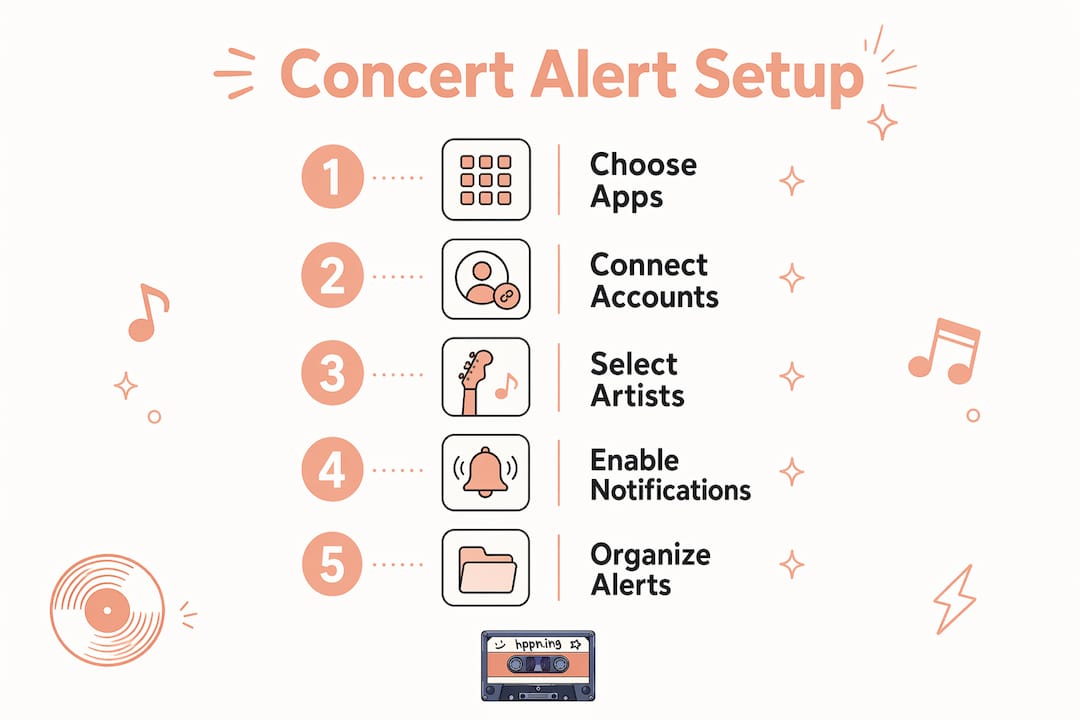
A structured setup takes about 20 minutes and pays off every time a favorite artist announces a tour.
- Follow your core artists. Open Songkick, Bandsintown, or your preferred discovery app. Search each artist by name and tap "Track" or "Follow." Start with your top 10 to 15 artists so your feed stays manageable.
- Set your location and radius. Most apps let you enter a home city and a travel radius, such as 50 or 100 miles. Set this first. Without it, you receive alerts for shows you cannot realistically attend.
- Enable push notifications and email alerts. Go into each app's settings and turn on both push and email. Push catches you in real time. Email gives you a searchable record you can reference later.
- Connect your streaming accounts. Link Spotify or Apple Music inside the app settings. Connecting streaming services to discovery platforms automates artist imports and keeps your tracking list current as your listening habits change.
- Add on-sale reminders to your calendar. When an alert arrives for a show you want to attend, immediately add two calendar entries: one for the ticket on-sale date and one for the show itself. Setting reminders for on-sale dates matters far more than event-day reminders for popular shows, because high-demand tickets sell out within minutes.
- Export events from discovery apps. Bandsintown and Songkick both offer calendar export functions that sync directly into Google Calendar, Apple Calendar, or Outlook. Use this feature to keep all your upcoming shows in one place.
Pro Tip: Limit your tracked artists to 30 or fewer per platform. More than that and your notification feed becomes noise. Prioritize artists whose shows you would genuinely attend, and add others only when a tour is announced.
Following live music tour dates across multiple platforms takes a little time upfront. The payoff is a system that runs in the background and alerts you automatically.
Common mistakes that cause fans to miss concert alerts
Most missed shows trace back to a handful of avoidable errors. Fixing them takes minutes.
- Relying on one app only. A single platform misses shows it does not have in its database. Using a hybrid system of discovery apps, official channels, and personal calendars catches far more events.
- Ignoring the spam folder. Email alerts from concert platforms frequently land in the Promotions or Spam tab. Check those folders and mark alert emails as "Not Spam" to train your inbox filter.
- Skipping presale channels. High-demand shows often require fan club memberships, venue newsletters, or specific credit card presale programs for early access. General platform alerts arrive after presale windows open, sometimes too late.
- Leaving location settings blank. Without a set location, apps either send alerts for every city or none at all. Always confirm your city and travel radius in each app's settings.
- Notification fatigue from too many tracked artists. When every alert feels like noise, fans start ignoring them. Trim your tracking list seasonally and remove artists you no longer prioritize.
Pro Tip: Create a dedicated email folder labeled "Concerts" and filter all alert emails into it automatically. This keeps your main inbox clean and gives you one place to check when planning your calendar.
Dedicated calendar layers with color coding for ticket sales versus show days reduce missed events significantly. Use one color for on-sale dates and another for the shows themselves. The visual separation makes it easy to see what requires action versus what is already handled.
Using concert alerts for travel planning and beyond
Concert alerts are not just for local show notifications. They are a practical tool for planning music-focused travel.
Setting alerts for out-of-town shows
Most discovery apps let you set alerts for multiple cities simultaneously. Add two or three cities you visit regularly or would travel to for the right show. When a favorite artist announces a date in one of those cities, you receive the alert just as you would for a local show. This approach works especially well for artists who rarely play your home market.
Alert systems serve travel planning as effectively as local concert tracking. A fan in a mid-size city might follow an artist who only tours major markets. Setting alerts for New York, Los Angeles, or Chicago means you catch those dates early enough to book flights and hotels before prices rise.
Adding festival and live-stream alerts
Festivals require a separate alert strategy. Most festival lineups announce months in advance, but individual artist set times and ticket tiers release on different schedules. Follow the festival's official social accounts and subscribe to their email list independently from your artist tracking apps.
Live-stream alerts work differently from in-person show alerts. Platforms that host live-stream concerts typically send alerts only through their own apps or email lists. Subscribe directly to those platforms and enable notifications separately. Streaming live concerts from home has become a standard part of how fans engage with artists between tours, and the alert setup mirrors what you do for in-person shows.
Using alerts to discover new artists
Concert alerts also surface artists you do not yet know. When a discovery app sends an alert for a show headlined by a tracked artist, it usually lists the opening acts too. Those support slots are one of the best ways to find new music through live shows. Tap the opener's name, preview a track, and decide if the full show is worth attending. Over time, your tracked artist list grows organically through the shows you already plan to attend.
Key Takeaways
A reliable concert alert system combines discovery apps, official artist channels, and calendar reminders to catch every show before tickets sell out.
| Point | Details |
|---|---|
| Use multiple platforms | Layer discovery apps, ticketing platforms, and streaming services to catch more shows. |
| Connect streaming accounts | Linking Spotify or Apple Music automates artist imports and keeps alerts current. |
| Prioritize on-sale reminders | Set calendar alerts for ticket sale dates, not just show days, for high-demand events. |
| Follow official channels | Fan clubs and venue newsletters unlock presale access that general apps miss. |
| Color-code your calendar | Separate on-sale dates from show dates visually to know what still needs action. |
Why most fans build their alert system backwards
Most fans I talk to set up one app, follow a handful of artists, and call it done. Then they wonder why they keep finding out about shows the week before, when tickets are gone or prices have tripled on the secondary market.
The mistake is treating concert alerts as a passive system. You set it up once and expect it to do everything. The reality is that no single platform has complete data. Songkick misses some regional shows. Bandsintown lags on smaller venue announcements. Ticketmaster only alerts you for artists you have explicitly followed in their system. Each platform has blind spots.
The fans who never miss a show treat their alert system like a living document. They check it monthly, add new artists, remove ones they have lost interest in, and verify that their location settings are still accurate. They also maintain at least one official channel connection per artist they care deeply about, whether that is a fan club, a newsletter, or a verified social account.
The other thing most guides skip: the calendar is the most underrated part of the system. An alert that arrives and gets dismissed is useless. An alert that immediately becomes a calendar entry with a follow-up reminder for the on-sale date is the difference between getting tickets and watching a show sell out while you were busy. Build the calendar habit from day one.
— Ari
Hppn makes live music discovery and alerts easier
Hppn is built for fans who want to go deeper than mainstream concert listings. The platform lets you browse local live music by location, preview artists through video and audio before committing to a show, and track emerging performers who rarely appear on major ticketing platforms.
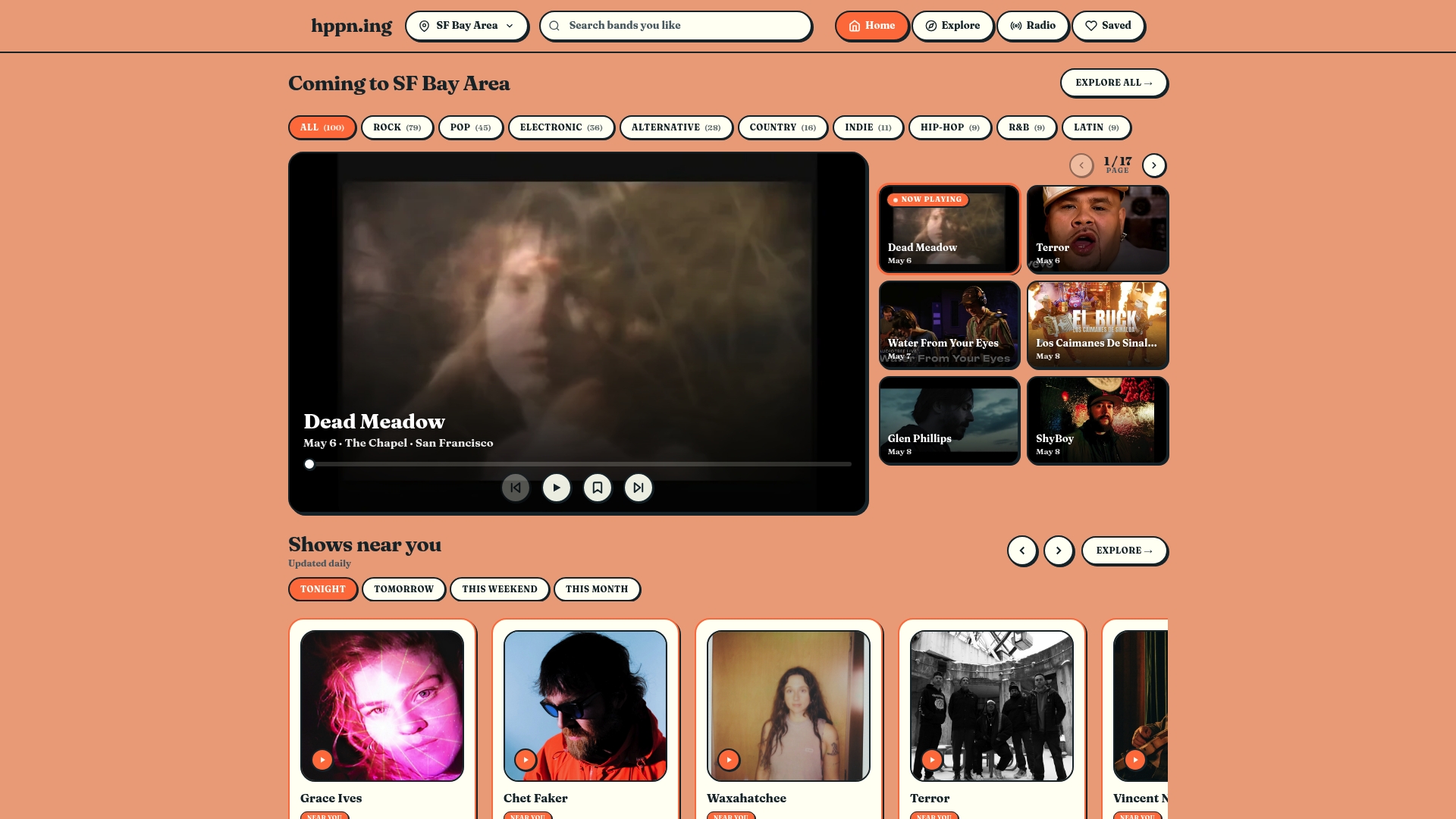
Hppn focuses specifically on the local and underground music scenes that general apps overlook. You can check trending artists in your city, discover who is playing small venues this weekend, and engage with a community of fans who share your taste. For fans building a complete alert system, Hppn fills the gap that mainstream platforms leave open: the shows happening right in your neighborhood that you would otherwise never hear about.
FAQ
What are live music alerts notifications?
Live music alerts notifications are push messages, emails, or calendar reminders sent by concert discovery platforms when a tracked artist announces a show or puts tickets on sale. They remove the need to manually check for new tour dates.
How do I set alerts for concerts on multiple platforms at once?
Follow your favorite artists on Songkick, Bandsintown, and Ticketmaster separately, then enable push and email notifications in each app's settings. Connecting your Spotify or Apple Music account to discovery apps automates the artist import process.
Why am I not receiving concert alerts I signed up for?
Check your spam or Promotions folder, as alert emails frequently land there. Also confirm that push notifications are enabled in your phone's system settings for each app, not just within the app itself.
How do I use concert alerts for travel planning?
Add secondary cities to your location settings in Songkick or Bandsintown. The apps send alerts for shows in those cities the same way they do for your home market, giving you enough lead time to book travel.
What is the best way to avoid missing ticket sales for popular shows?
Set a calendar reminder specifically for the ticket on-sale date, not just the show date. On-sale reminders matter most for high-demand events, where tickets can sell out within minutes of going live.