

Finding the right concert used to mean scrolling through pages of irrelevant shows. The types of concert browsing filters available today cut that down to a targeted list in seconds. The main categories are date, genre, location, popularity, price range, venue type, artist tier, event format, and accessibility. Platforms like Spotify Live Events and Bandsintown each apply these filters differently, but the core logic is the same across all of them.
Here is a quick map of what each filter does:
- Date: Specific days, preset windows like "This Weekend" or "Next 7 Days"
- Genre: Broad tags (rock, pop) down to niche ones (synthwave, cumbia)
- Location: City, metro area, or adjustable radius from a zip code
- Popularity: Trending shows, sold-out flags, or tickets remaining
- Price range: Budget cap or minimum spend
- Venue type: Stadium, club, outdoor amphitheater, DIY space
- Artist tier: Headliners versus opening acts
- Event format: Festival, solo show, benefit concert
- Accessibility: ADA seating, wheelchair access, sensory-friendly options
1. How date filters help you find concerts at the right time
Date filters include specific date picks and preset ranges like "Next 7 Days" or "This Weekend," which makes planning around a busy schedule much easier. You pick an exact Saturday, or you let the platform show everything happening in the next two weeks. Both approaches serve different needs.
The preset ranges are the faster option for casual browsing. Custom date selection is better when you are planning around a specific trip or a day off. Some platforms also let you exclude dates, which is useful if you already have plans on certain nights.
- Specific date: Pin down a single day for a birthday outing or a free evening
- Preset ranges: "Today," "This Weekend," "Next 7 Days," "This Month"
- Custom range: Set a start and end date for a travel window
- Recurring events: Some platforms flag weekly residencies or multi-night runs
Pro Tip: When planning a trip, set your date filter to your full travel window first, then layer in genre and location. You will catch shows you would have missed by searching one night at a time.
2. How genre filters match concerts to your actual taste

Genre filters span from broad categories like rock, pop, and hip-hop all the way to niche tags like folk, electronic sub-genres, and regional styles. That range matters because a fan of ambient techno and a fan of classic rock are both searching under "electronic" and "rock" respectively, but they want completely different shows.
Most platforms present genres as dropdowns or tag clouds. Selecting multiple tags at once usually returns a union of results, not an intersection, so check whether the platform uses "and" or "or" logic between tags. Hppn takes this further by letting you find genre-specific live shows while also previewing the artist's sound before committing to a ticket.
- Broad genres: Rock, pop, country, hip-hop, jazz, classical
- Niche genres: Synthwave, cumbia, shoegaze, bluegrass, K-pop
- Multi-genre tagging: Select two or three to catch crossover acts
- Sub-genre tags: Some platforms go deep enough to distinguish doom metal from black metal
3. How location filters connect you to shows near you or anywhere you travel
Location filters let you search by city, metro area, or a radius around a zip code, commonly up to 150 miles. That radius option is especially useful for fans in smaller markets who are willing to drive to a nearby city for the right show.
Locals typically set a tight radius to find walkable or transit-accessible venues. Travelers do the opposite: they drop a pin in an unfamiliar city and expand the radius to see everything within reach. Combining location with a date range and a genre tag is where these filters get genuinely powerful. Hppn's approach to location-based concert browsing goes a step further by surfacing emerging artists performing nearby, not just the headliners everyone already knows.
- City or metro area: Standard starting point for most searches
- Zip code radius: Expand or shrink the search area in increments
- Neighborhood-level: A few platforms let you filter by specific districts
- Map view: Visualize venue clusters instead of reading a list
4. Popularity and ticket availability filters
Popularity filters surface what is trending, selling fast, or already sold out. A "sold out" flag sounds like bad news, but it signals demand worth tracking: many platforms let you join a waitlist or watch for resale tickets directly from that filtered view.
"Tickets remaining" filters work the other way. They show shows with low inventory, which can indicate either a hot act in a small venue or a last-minute opportunity at a larger one. Either way, it is useful information that a plain date-and-genre search would bury.
5. Price range filters for budgeting your concert calendar
Price filters let you set a maximum spend per ticket, which keeps the results honest when you are on a budget. Some platforms also let you set a floor, useful if you want to avoid the cheapest seats in a stadium where the view is genuinely bad.
Pairing a price filter with a venue-size filter is a practical move. A $30 cap at a 300-capacity club often gets you a front-row experience. The same cap at an arena puts you in the upper deck.
6. Venue type and size filters
Venue filters let you choose between stadiums, arenas, theaters, clubs, outdoor amphitheaters, and DIY spaces. The difference between a 200-person club show and a 20,000-seat arena is not just scale. It is sound quality, crowd energy, artist proximity, and how long you wait at the bar.
Fans who prefer intimate shows can filter out arena events entirely. Festival-goers can do the opposite and surface only multi-stage outdoor events. This filter category overlaps with event format filters, but venue size is a distinct variable worth controlling separately.
7. Event format filters: festivals, solo shows, and benefit concerts
Event format filters let you choose the structure of the show itself. Festivals, solo concerts, and benefit shows each offer a different experience, and fans often have a strong preference. Filtering by format saves you from wading through a festival lineup when you just want a tight 90-minute club set.
Benefit concerts and charity shows sometimes appear in their own category on larger platforms. If you want to support a cause through live music, this filter surfaces those events without requiring you to know the specific artist or date in advance.
8. Artist tier filters: headliners versus opening acts
Some platforms let you filter by artist popularity or billing position. Filtering for opening acts or emerging artists is one of the best ways to find a show before a band blows up. Hppn is built around exactly this idea: surfacing artists who are not yet household names but are performing live right now.
Headliner filters work well when you want to catch a specific-caliber show without knowing the exact artist. Set the tier, pick your genre, and the results do the work.
9. Accessibility filters for concert-goers with specific needs
ADA-compliant seating and wheelchair accessible options are available as dedicated filters on several major ticket platforms. These filters remove listings that do not meet accessibility standards, so fans are not left sorting through results manually.
Beyond wheelchair access, some platforms flag sensory-friendly performances, companion seating, and elevator access. These details rarely appear in a standard event listing, which is exactly why the filter exists.
10. Effective strategies for combining concert browsing filters
Layering filters is where the real efficiency comes from. Start with location and date, then add genre. That three-filter combination alone cuts most concert catalogs from hundreds of results to a manageable dozen.
From there, apply the less obvious options. The "Hide Obstructed/Partial View" filter removes tickets with blocked sightlines before you even see the price. The "Hide Piggyback Seats" option eliminates pairs where one seat sits directly behind the other instead of side by side. If you are buying close to the show date, the "Electronic Delivery Only" filter ensures your tickets arrive instantly rather than waiting on a seller to confirm and ship.
Pro Tip: The "Best Seat" filter on some platforms rates seats on a 1–5 star scale using automated algorithms that weigh proximity and sightline quality. It is not always the cheapest option, but it removes the guesswork on unfamiliar venues.
11. How Hppn approaches concert discovery beyond standard filters
Hppn combines the filter categories above with artist audio and video previews, so you can hear an unfamiliar act before deciding whether the show is worth attending. That preview layer changes how filters work in practice. Instead of filtering down to a list and then researching each artist separately, you do both in one place.
The platform focuses on emerging and underground artists, which means the location and genre filters surface acts that standard ticket marketplaces often miss entirely. Hppn's best practices for concert discovery also address how to follow verified sources to cut through social media noise and get accurate event information. For fans who want to find something genuinely new, that combination of filtering and discovery is the core of what the platform offers.
Discover concerts your way with Hppn
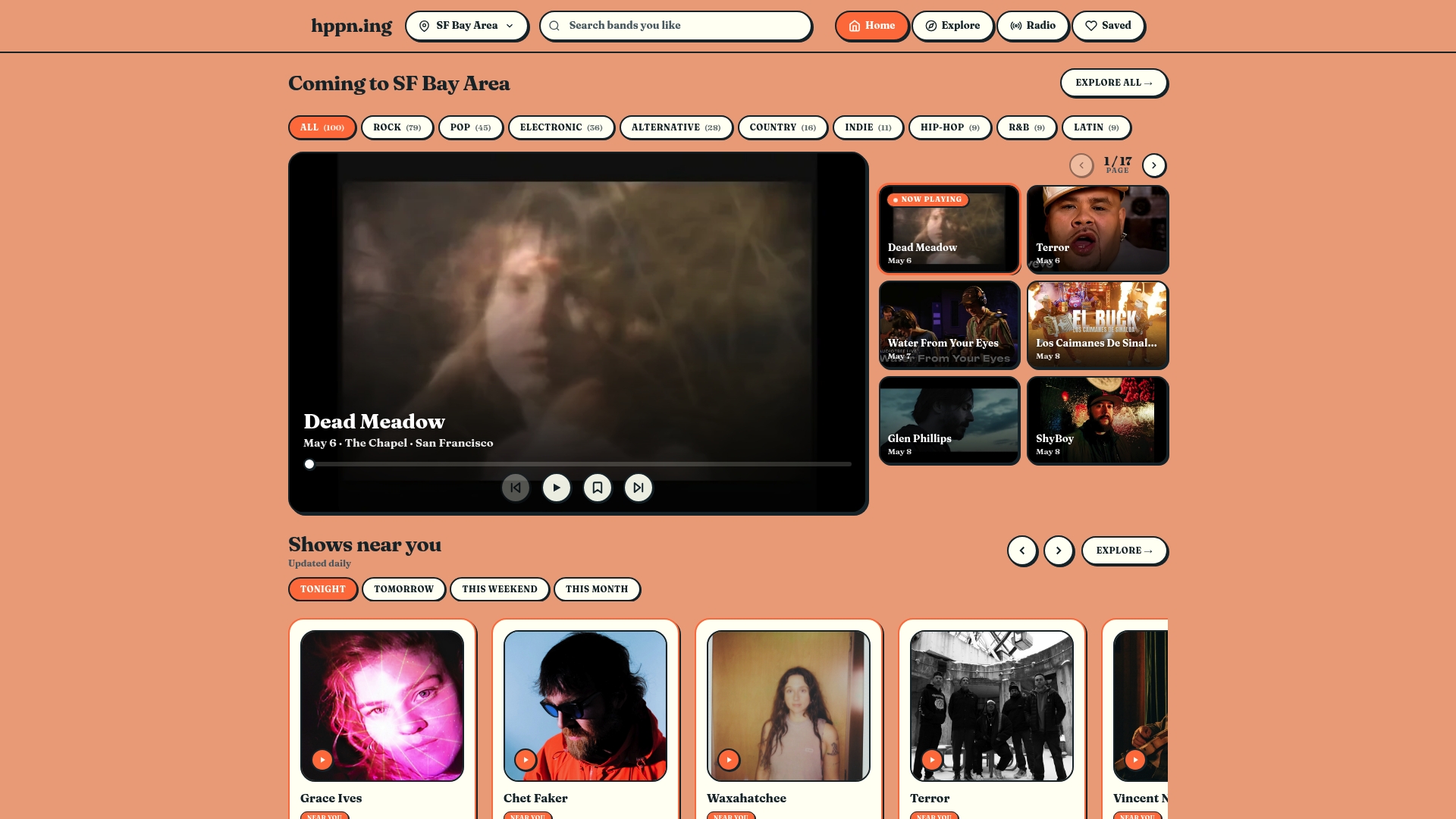
Hppn puts every filter type covered here into a single live music discovery experience, with artist previews built in so you never buy a ticket blind. Whether you are searching by neighborhood, genre, or show format, explore live music near you and find your next favorite act before everyone else does.
Key Takeaways
The most effective concert browsing strategy layers date, genre, and location filters first, then adds seat quality and delivery filters to refine the final purchase.
| Point | Details |
|---|---|
| Start with three core filters | Date, genre, and location together cut most catalogs to a manageable list fast. |
| Use seat quality filters | The Best Seat filter rates seats 1–5 stars using proximity and sightline algorithms. |
| Filter for instant delivery | Electronic Delivery Only shows tickets confirmed immediately, critical for last-minute buys. |
| Remove poor seats upfront | Hide Obstructed View and Hide Piggyback Seats eliminate bad options before you see prices. |
| Hppn adds artist previews | Hppn pairs standard filters with audio and video previews for emerging and local artists. |